
Microsoft Build 2025 delivered a wave of updates for agent makers. I’ve pulled together the announcements across Copilot Studio and Power Platform that stood out most to me- especially those that will shape how we build intelligent, responsive, and business-aware agents.
Copilot Tuning in Copilot Studio
Copilot Tuning is a leap forward for customisation. It allows organisations to fine-tune Microsoft 365 Copilot using their own data, workflows, and tone—without writing code. This means you can build domain-specific agents that reflect your business’s language, structure, and expertise.
For example, a legal firm could create an agent that drafts documents in their preferred format, using past work as a guide. This kind of tuning makes Copilot more than just a helpful assistant—it becomes a true extension of your team, grounded in your unique context.

Agent Feed and Agent Flows in Power Apps
The new Agent Feed in Power Apps introduces a dynamic way to interact with your agents. It functions like a social feed, surfacing updates, suggestions, and insights in a format that’s easy to scan and act on. This makes it easier to stay on top of what your agents are doing and how they’re evolving.

Furthermore, Agent flows bring deeper integration between Power Apps and Power Automate. You can now trigger flows directly from within Power Apps with easy-to-configure actions, like sending alerts or initiating approvals.

Power Apps Plans: Enhancements
Plans in Power Apps is now generally available. There were a number of enhancements to plans announced at Build. Plans guide you through mapping out your business problem, personas, processes, and data tables. Improvements coming to plans include:
- Bring in your existing Dataverse tables and build relationships between them
- Incorporate existing apps into the solution, so you’re not starting from scratch
- Recommend the right Copilot agents based on the business context you’ve defined
- Suggest Power Pages to support external-facing scenarios or customer interactions
This means you’re not just designing an agent—you’re designing a complete solution. Plans help you think holistically about how agents, apps, and pages work together to solve real business problems.

Generative Pages in Power Apps
Generative Pages is one of the most creative updates. You can now describe the app experience you want in natural language, and Power Apps will generate a working UI using React code. You can even upload reference images and link Dataverse tables to guide the design.
In one demo, a user asked for an app styled with Heineken branding and an embedded 8-bit game—and Power Apps delivered. This feature is perfect for rapid prototyping and for makers who want to bring ideas to life quickly without diving into code.
I highly recommend watching the session Build agent-first solutions with Power Platform and Copilot Studio to check out the demos for agent feed, plans and generative pages.

Embedded Agent Builder Enhancements
Agent Builder is the lightweight version of Copilot Studio that can be used in Microsoft 365 Copilot to quickly create your own agents. Enhancements include:
- The authoring experience is getting an upgrade, and you’ll be able to build and edit agents in full-screen mode directly within M365 Copilot.
- Drag and drop files from anywhere to use as knowledge sources for your agents. This makes it easier to bring in PDFs, Word docs, and other content without needing to pre-load them into SharePoint or OneDrive.
- Agents can use your Teams chat history, Outlook emails, calendar events, and SharePoint content as knowledge sources. This means your Copilots can answer questions using the same context you work in every day.
It’s a step toward to making agents feel like true team members—able to reference past conversations, upcoming meetings, and shared documents to provide more relevant and helpful responses.

New Analytics in Copilot Studio
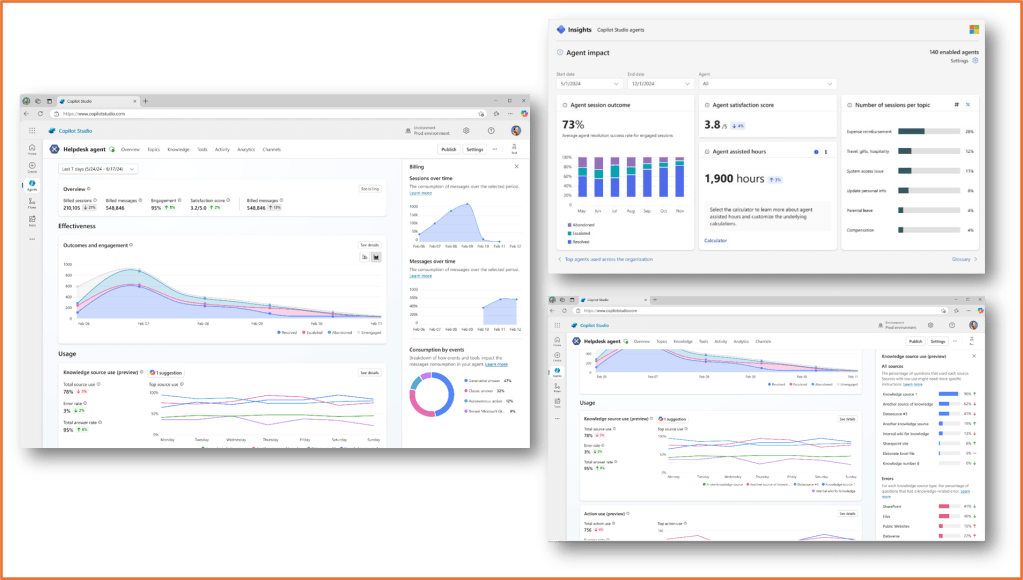
Copilot Studio now includes deeper analytics to help you understand how your agents are performing. You can:
- Cluster queries to identify common themes
- Debug knowledge sources to spot gaps or errors
- Build test sets for structured validation
- Track source usage, answer quality, and error rates
These tools make it easier to iterate, improve, and scale your agents with confidence.
Knowledge Control and RAG Pipeline Customisation
You now have fine-grained control over your Retrieval-Augmented Generation (RAG) pipeline. Soon, you’ll be able to provide custom instructions per data source and choose which model to use for each knowledge source.
This level of control allows teams to fine-tune how their agents generate responses and ensure they’re aligned with business goals and tone.

Computer Use: UI Automation Without APIs
This feature will allow agents to interact with systems using UI automation, meaning they can perform tasks on screen just like a human would—clicking buttons, filling out forms, navigating menus—even if the system doesn’t expose an API.
It’s perfect for legacy systems or websites that don’t have modern integrations, and it opens up new possibilities for automation across your organisation. This feature brings Copilot Studio closer to full robotic process automation (RPA), but with the added intelligence of generative AI.

Multi-Agent Support
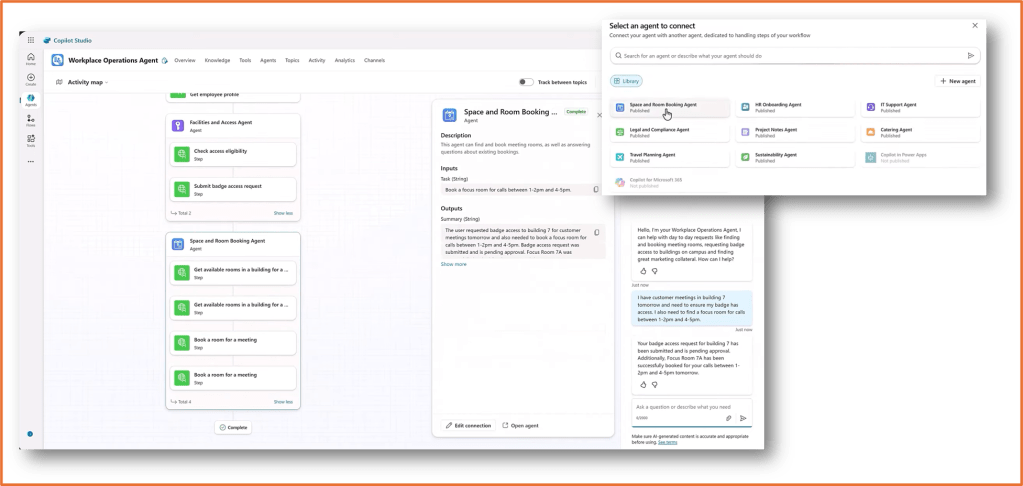
Multi-agent support in Copilot Studio means that you can design and deploy multiple agents that can work together, each with its own role, responsibilities, and knowledge base to solve more complex, multi-step business problems. For example:
- One agent might handle data intake—gathering information from users or systems.
- Another could be responsible for summarising or transforming that data.
- A third might manage approvals or escalations, interacting with human stakeholders.
Each agent can be tuned to a specific domain or task, and they can pass context and outputs between one another. This modular approach mirrors how teams work in real life and it makes your AI solutions more maintainable, scalable, and adaptable.

 Rishona Elijah