
Microsoft’s 2025 Release Wave 2 includes updates that make Copilot Studio and Power Automate more capable, flexible, and easier to use. Many of these features have been announced at Microsoft Build earlier this year, but have dates for general availability added.
Automate web and desktop apps with computer use
Generally available October 2025
“Computer use” is currently available as a preview feature in Copilot Studio. Computer use allows agents to carry out tasks on websites and desktop apps in a way that mimics how a person would. It uses a virtual mouse and keyboard to click buttons, fill in forms, and move through screens, even when there’s no API available. The feature runs on Computer-Using Agents (CUA), which can adjust to layout changes and follow plain language instructions. You don’t need to write any code.
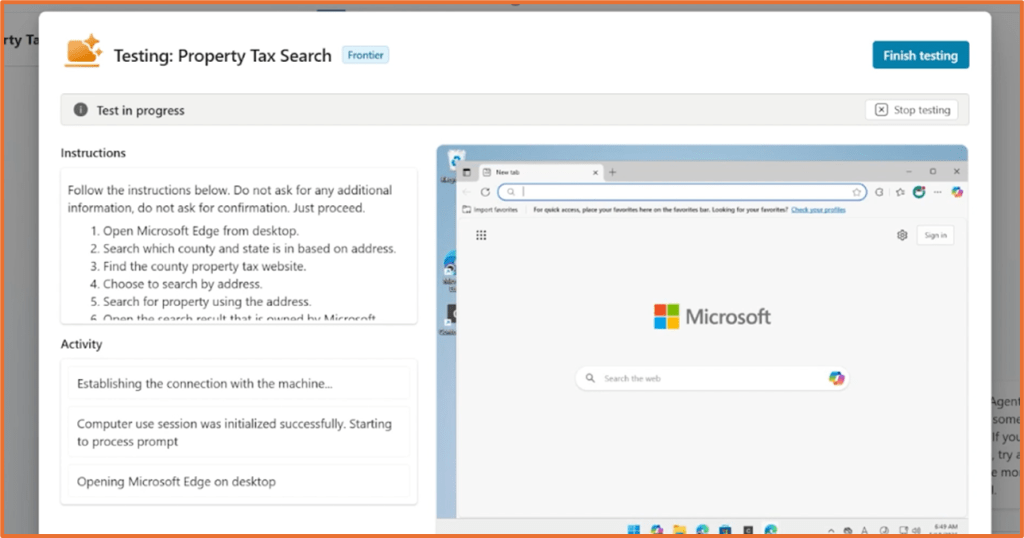
For example, the feature could be used in an agent for handling invoice processing. Instead of typing data into an older accounting system that doesn’t support APIs, the agent reads the invoice and enters the details directly into the desktop app. It clicks, types, and navigates just like a person would. This brings processing time down from hours to minutes and improves accuracy.
Advanced approvals & intelligent approvals
Generally available October 2025
Advanced approvals and intelligent approvals are two improvements for handling approvals in your flows. Intelligent approvals help speed up routine decisions by reducing turnaround times from days to minutes. This feature uses a large language model to assess requests based on natural language prompts and context such as documents or images. Makers can choose whether approvals happen automatically or if they need someone to review them.
For example, intelligent approvals could be used by a procurement team to quickly process purchase requests under $5,000. Instead of waiting for someone to manually sign off, the AI checks the request, reviews attached quotes and policy documents, and approves it straight away if it meets the criteria. This helps avoid delays and ensures suppliers are paid on time.
Furthermore, with advanced approvals, users can set up approval processes with several stages. Each stage has its own group of stakeholders who make decisions and can be configured separately to suit the needs of those stakeholders.

Build enhanced connectors with the Power Platform Connector SDK and PowerFx
Generally available October 2025
This feature lets makers create Power Platform connectors using structured data. These connectors support Power Fx, which helps with more flexible app building and improves how agents work in Copilot Studio.
Using the Power Platform Connector SDK, developers can build a Web API that provides structured data. Once it’s registered as a connector in a Power Platform environment, makers can use it straight away without needing extra setup. It adds more options for how they work with data.
Test and debug agent actions in Copilot Studio
Generally available November 2025
This lets you test and fix agent actions before publishing, so you can catch problems early and make sure everything works as expected. The testing setup gives clear, useful feedback and works smoothly within Copilot Studio or Microsoft 365.
You can track errors using plugin run history, in-line suggestions, and workflow visibility. These tools make it easier to find and fix issues and improve how your agent performs. You can also use test data to check actions in a controlled setting, which helps you feel confident before going live.
Analyse action usage across agents
Generally available November 2025
Copilot Studio will include analytics to show how actions are used across agents. This can help identify which actions are useful, which need work, and where to focus improvements. It will show key metrics such as answer rate, action usage rate, and error rate. You also get a detailed breakdown of errors, which makes it easier to spot and fix specific problems.
Create and edit expressions with Copilot
Generally available December 2025
Writing expressions in Power Automate can be tricky, especially for new users. Copilot will now help with creating and editing expressions, making it easier to build logic without needing to remember syntax.
Debug easily into condition actions at runtime
Generally available December 2025
In Power Automate, a new debugging feature will let users step into condition actions during runtime. You’ll be able to see how your flow behaves and fix issues as they happen.
Instead of only seeing a true or false result, you can view the actual values passed into dynamic content and the output of each expression. This helps you identify exactly where a condition failed, especially when multiple variables are involved.
After a flow runs, you’ll see detailed results for each row in the condition action. This makes it simpler to find issues and improve your logic.

Build desktop flows with record with Copilot
Generally available December 2025
Copilot in Power Automate Desktop will simplify the desktop flow-building process. You can record a desktop flow by sharing your screen and describing the task. Copilot captures your voice, mouse movements, and keyboard inputs, then turns them into a flow. You can review, edit, and save the flow before running it.


 Rishona Elijah