
Microsoft is continuing to expand Copilot and AI agents across the Microsoft 365 ecosystem. I’ve recapped some of my top announcements from the last few months (September-November 2025), which were showcased at Power Platform Conference and Microsoft Ignite. These updates make automation, app building and collaboration more accessible than ever.
Many of these features are available via the Frontier program, which your IT admin can enable.
1. Workflows Agent
Workflows is now available through the Frontier program and brings natural language automation to Microsoft 365. Instead of wiring connectors or writing steps, you simply describe what you want, and Copilot builds the workflow across Outlook, Teams, SharePoint, Planner and Approvals.
This is a quick win for individuals that need reliable automation without long development cycles. Makers can go from idea to automation in minutes.
How it works:
Open Copilot, select the Workflows agent and describe the outcome. For example:
“Each weekday morning, review unread emails from the last 24 hours, organise them into Needs Response, For Your Information and Other Important Emails, include sender, subject, summary, deadlines and next steps, then send me the digest in Teams.”
Copilot turns that description into a scheduled flow and shows the steps in real time so you can refine the build.

Read more: Get started with Workflows in Microsoft 365 Copilot – Microsoft Support
Availability: Frontier program
2. App Builder
App Builder makes creating apps simple and accessible. You do not need coding skills or a database, just your ideas. Upload a document or notes about your app idea, and Copilot will turn it into a working app. Data is stored in Microsoft Lists. You can adjust layouts, add tabs or pull content from documents by prompting Copilot.
The agent lowers barriers for makers and businesses. Makers can quickly build tools like onboarding checklists or project dashboards using existing Microsoft 365 content.

Examples of apps you can build:
- Track team tasks, project milestones and updates
- Create interactive diagrams and flash cards for learning
- Build a quiz app where teams can take quizzes, track scores and compare metrics
Read more: Microsoft 365 Copilot now enables you to build apps and workflows | Microsoft 365 Blog
Availability: Frontier program
3. Vibe for Power Apps
Vibe is the new Power Apps experience. It builds on the current Power Apps Plans functionality. It introduces a team of four AI agents called requirements, data, solutions and coding that collaborate to build complete apps step by step. It generates design files, services and multiple app pages, while creating a robust Dataverse-backed model. Users can interact with the agents to make real-time changes, such as styling the app with brand colours or even adding in a game for users.

Read more: Overview of the new Power Apps experience – Power Apps | Microsoft Learn
Availability: Preview (US region environments). Try out at https://vibe.powerapps.com/
4. Work IQ
Work IQ is Microsoft’s new intelligence layer that adds memory and reasoning to Copilot, going beyond Microsoft Graph which only surfaces data. It learns from your patterns, preferences and relationships to understand what matters most in your workflow. This means Copilot can provide context-aware responses, such as identifying relevant files and suggesting the right people for a project. Work IQ works as a feedback loop, refining its understanding over time to deliver more personalised support. For organisations, it enables AI agents to offer accurate and adaptive experiences without manual configuration.

Read more: Microsoft Ignite 2025: Copilot and agents built to power the Frontier Firm | Microsoft 365 Blog
Availability: Frontier program
5. Agent Mode in Excel
Agent Mode in Excel takes Excel beyond its current Copilot experience. Today, Copilot in Excel can summarise data, create charts and suggest formulas based on the data already in your workbook. Agent Mode goes further by introducing a natural language interface combined with integrated web search and external data access.
Instead of writing complex formulas or manually importing data, you can simply describe what you want. For example:
“Create a financial monthly close report for a bike shop business, including a breakdown of product lines across VTB, VTF, sequential and year-over-year growth. Use standard financial formatting and best practices.”
Copilot will build the report, apply formatting and explain each step so you can learn and refine as you go. You can guide the agent, make manual changes and iterate together until the results meet your needs.

Read more: Introducing Word, Excel, and PowerPoint Agents in Microsoft 365 Copilot | Microsoft Community Hub
Availability: Frontier program
6. Office Agents for Word, Excel and PowerPoint
The new dedicated agents for Word, Excel and PowerPoint bring Copilot’s intelligence directly into chat. Instead of opening each app, you can create documents, spreadsheets and presentations by simply describing what you need in Chat. These agents can also reason over the web, pulling in information to enrich your content.
Imagine asking: “Create a three-slide presentation summarising the latest trends in the energy sector, using data from my recent reports and credible online sources.” Copilot will generate the slides, apply formatting and even suggest visuals.
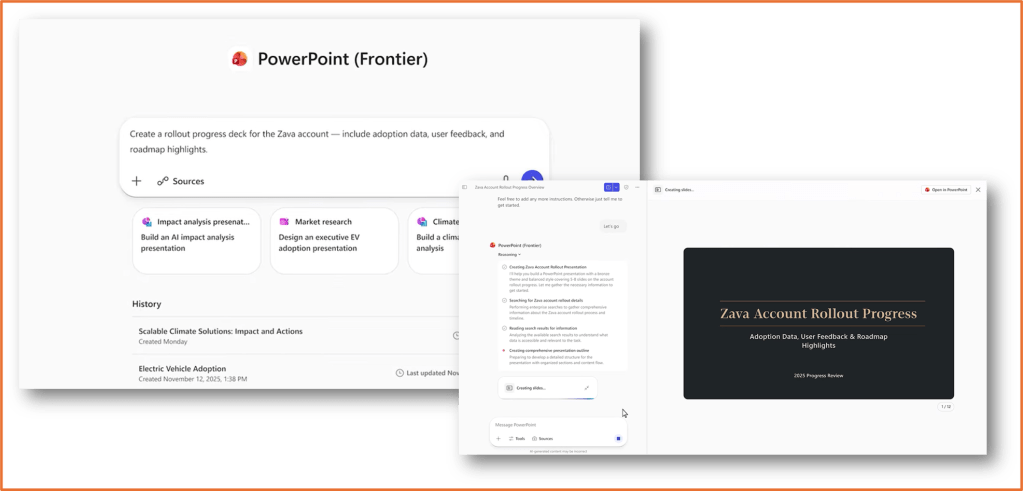
Read more: Introducing Word, Excel, and PowerPoint Agents in Microsoft 365 Copilot | Microsoft Community Hub
Availability: Frontier program
7. Copilot Chat in Outlook
Copilot Chat in Outlook will be available to users without a premium Microsoft 365 Copilot license! It will understand the full context of your inbox, calendar and meetings, not just individual emails. This means you can ask it to prioritise messages, prepare for meetings and surface insights across all communications.

Availability: Preview in March 2026
8. Workforce Insights, People and Learning Agents
These three agents are powered by Work IQ and designed to support leaders and employees.
- Workforce Insights Agent: Gives leaders real-time data on roles, tenure and location to spot trends and make informed decisions.
- Learning Agent: Delivers personalised microlearning and curated courses aligned with team and company goals.
- People Agent: Helps employees find and connect with colleagues by role, skill or function, and suggests the best way to reach out.
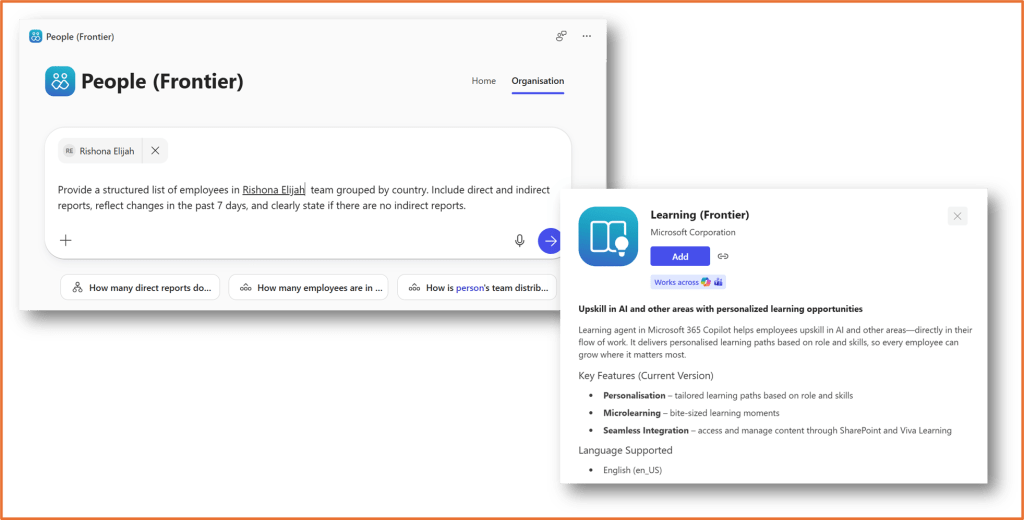
Read more: Introducing new Microsoft 365 Copilot agents to drive workforce transformation | Microsoft Community Hub
Availability: Frontier program
9. Teams Mode for Copilot
Teams Mode turns Copilot from a personal assistant into a collaborative team member inside Microsoft Teams. You can bring Copilot into group chats and channels so everyone can interact, ask questions and access AI-powered insights together.
This enables real-time brainstorming, meeting summaries and shared problem solving. For example, you might start a group chat with Finance, Sales and Product teams to explore a new market opportunity. Copilot brings each perspective together in one shared chat, helping the team build a stronger business case.

Read more: Introducing Teams Mode for Microsoft 365 Copilot | Microsoft Community Hub
Availability: Public preview
10. Agent 365
As organisations adopt more AI agents, managing them becomes critical. Agent 365 is Microsoft’s new control center for monitoring and protecting agents across your organisation. It provides visibility into every agent, what they are doing and who they are connected to.
Capabilities include:
- Deploy and organise agents from Microsoft, partners and custom builds
- Manage access to information and ensure compliance
- Quickly identify issues and maintain governance
Read more: Microsoft Agent 365: The control plane for AI agents | Microsoft 365 Blog
Availability: Frontier program
11. Copilot Studio: Agent Evaluation
Agent Evaluation in Copilot Studio is designed to help makers validate that an agent works as intended before it is deployed to users. This feature automates the testing process by generating test prompts for your agent, running those prompts and capturing the responses. Each response is then scored, giving you clear metrics to review. You can see which prompts passed, which failed and where improvements are needed.

Read more: Build smarter, test smarter: Agent Evaluation in Microsoft Copilot Studio | Microsoft Copilot Blog
Availability: In preview

 Rishona Elijah