
Microsoft Learn
Browse all courses, learning paths, and modules – Training | Microsoft Learn
For self-paced learning on Power Platform and other Microsoft products. Microsoft Learn contains training, technical documentation, videos, challenges and more.
Microsoft Learning Room
Learning Rooms are a space to find connections with experts and peers.
Power Platform & Copilot with Rishona is a Microsoft Learning Room that provides a supportive and encouraging environment for people starting their Power Platform journey or wanting to learn more about Microsoft’s Copilots. The room offers assistance and guidance on Power Platform topics, including certifications, Power Apps, Power Automate, and AI Builder. On the Copilot side, the room offers resources to get you started exploring Microsoft Copilot Studio, and Copilots for Microsoft 365, Bing, Windows, Dynamics 365 Customer Engagement apps and Power Platform.
Sign up for my room Power Platform & Copilot with Rishona here.
Workshops (“In a Day”)
Microsoft offers free hands-on training for beginners. During the training an instructor will take you through an introduction into the Power Platform tool and concepts, while you get to build an app of your own. This training is run by Microsoft partners worldwide, and you can sign up for an upcoming session from the Microsoft Events Catalog.
While joining a workshop alongside an instructor is ideal, the attendee material is available online, so you can also try it on your own:
- App in a Day
- Dashboard in a Day
- Copilot Studio in a Day
- Power Pages in a Day
- Automation in a Day
- Dataverse for Teams in a Day
If you have attended App in a Day, you may like to save what you built- especially if it was done in a trial account set to expire. Here is an overview of how to export and import solutions so you can keep your work. How to export and import your solutions (such as saving what you’ve built during App in a Day) – Rishona Elijah (rishonapowerplatform.com)
Applied Skills and Certifications
PL-900 Microsoft Power Platform Fundamentals is the introductory certification for Power Platform. To undertake this exam, you’ll need to learn the business value and product capabilities of Microsoft Power Platform.
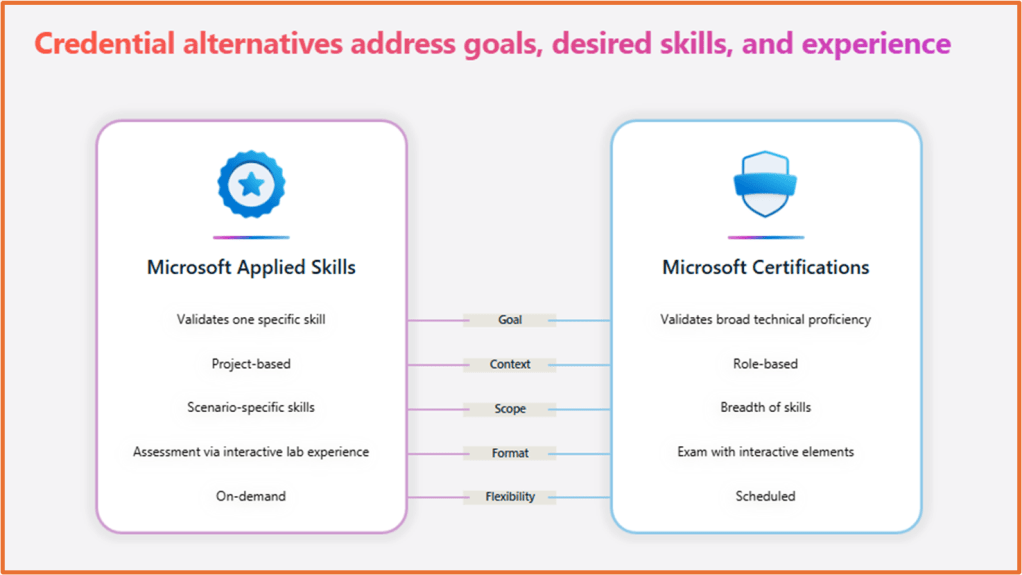
Applied Skills is another way to demonstrate your Power Platform knowledge. These are verifiable credentials that validate specific skills needed to implement scenario-based projects. Applied Skills assessments are on-demand, lab-based, and free to take.
Certifications vs Applied Skills
- Certifications validate broad technical proficiency in a job role, like Azure developer; and Applied Skills credentials validate proficiency in a technology-specific project, such as “Build a solution with Azure AI services.”
- To earn a certification, an individual must pass a proctored, scheduled exam that has interactive elements; and to earn an Applied Skills credential, an individual must pass an on-demand, lab-based assessment, using the actual technology to complete the tasks.
Applied Skills assessments are available to take on Microsoft Learn. There are currently 3 credentials related to Power Platform:
- Create and manage automated processes by using Power Automate – Applied Skills | Microsoft Learn
- Create and manage canvas apps with Power Apps – Applied Skills | Microsoft Learn
- Create and manage model-driven apps with Power Apps and Dataverse – Applied Skills | Microsoft Learn
LinkedIn Learning Courses
LinkedIn Learning has courses to help you prepare for your Power Platform certifications- but they can also be used just to further your knowledge. You’ll need a LinkedIn Learning subscription, but you can usually access the courses for free for 24 hours. It’s a great way revise the topics as you study. These are the beginner-level courses:
- Exam Tips: Power Platform Fundamentals (PL-900) by April Dunnam
- Microsoft Power Platform Fundamentals (PL-900) Cert Prep: Core Components by Julie Yack
- Microsoft Power Platform Fundamentals (PL-900) Cert Prep: Power Virtual Agents by Rishona Elijah (me!) (product now known as Copilot Studio)
- Microsoft Power Platform Fundamentals (PL-900) Cert Prep: Power Apps by Lisa Crosbie
- Microsoft Power Platform Fundamentals (PL-900) Cert Prep: Power BI by Emilio Melo
- Microsoft Power Platform Fundamentals (PL-900) Cert Prep: Power Automate by Elaiza Benitez
For something a bit more advanced, I’ve got a course covering the PL-200 Power Platform Functional Consultant certification.
Power Platform Tools
These are the links to the Power Platform tools. If you want to practice building in Power Apps (including Dataverse), Power Pages, AI Builder, Copilot Studio and Power Automate, see the instructions on how to sign up for a Developer Plan in the next section below.
- Power Apps, Dataverse, AI Builder: https://make.powerapps.com/
- Power Pages: https://make.powerpages.microsoft.com/
- Power Automate & AI Builder: https://make.powerautomate.com/
- Copilot Studio: https://copilotstudio.microsoft.com/
- Power BI: https://app.powerbi.com/ or install Power BI Desktop free from the Microsoft Store
Sign up for a Developer Plan
Create a free developer environment for Power Platform – Rishona Elijah (rishonapowerplatform.com)
Sign up for a Developer Plan to get free and ongoing access to Power Apps and premium features. You can use this environment to try out features and practice your building.
Sign up for the Power Up program
Are you currently in a non-tech role but want to explore a career with Power Platform? Power Up 🚀 is a free program by Microsoft where you go through training to upskill on the Power Platform tech and prepare yourself to gain a certification. Register your interest here: Microsoft Power Up Program for career switchers
Power Platform Communities
Post questions on the forum, find user group events near you, and browse the gallery.
When you’re off building your own apps and need some help, you can post a question in the Power Platform Communities forum. Experts are on hand there to help you out. You can also browse the Gallery to check out apps, automations and more that have been created by talented community members.

YouTube
- Lisa Crosbie: Focus on Copilot and model-driven apps
- April Dunnam: Focus on canvas apps
- Reza Dorrani: Focus on canvas apps
- Dewain Robinson: Focus on Copilot Studio

 Rishona Elijah